Server memory plays a crucial role in determining the performance, stability, and scalability of any IT infrastructure. Whether you’re managing a small business server, a virtualization environment, or a large-scale data center, selecting the right RAM type is essential.
Among the most common server memory options available today are UDIMM (Unbuffered DIMM), RDIMM (Registered DIMM), and LRDIMM (Load-Reduced DIMM). While they may appear similar, each serves a different purpose and offers distinct advantages.
This guide explains the differences between RDIMM, UDIMM, and LRDIMM, helping IT professionals, system integrators, and server buyers make informed decisions.
Understanding Server Memory Types
Before comparing them, let’s understand what these memory modules are designed for.
What is UDIMM?
UDIMM stands for Unbuffered Dual Inline Memory Module. It is the most common memory type used in desktops, workstations, and entry-level servers.
In a UDIMM module, the memory controller communicates directly with the DRAM chips without any intermediary register.
Key Characteristics of UDIMM
- Lower latency
- Lower cost
- Limited memory capacity
- Suitable for small servers and workstations
- Less electrical stability at high capacities
What is RDIMM?
RDIMM stands for Registered DIMM. It includes a register between the memory controller and DRAM modules.
This register buffers command and address signals, reducing electrical load on the memory controller.
Key Characteristics of RDIMM
- Higher reliability
- Better scalability
- Supports larger memory capacities
- Commonly used in enterprise servers
- Improved signal integrity
RDIMM is the preferred choice for most enterprise-grade server deployments.
What is LRDIMM?
LRDIMM stands for Load-Reduced DIMM. It takes memory buffering a step further by using an isolation memory buffer (iMB).
This design reduces the electrical load even more than RDIMM, allowing servers to support significantly larger memory capacities.
Key Characteristics of LRDIMM
- Highest memory density
- Excellent scalability
- Ideal for memory-intensive workloads
- Higher cost compared to RDIMM
- Commonly used in data centers and virtualization environments
RDIMM vs UDIMM vs LRDIMM Server RAM: Quick Comparison
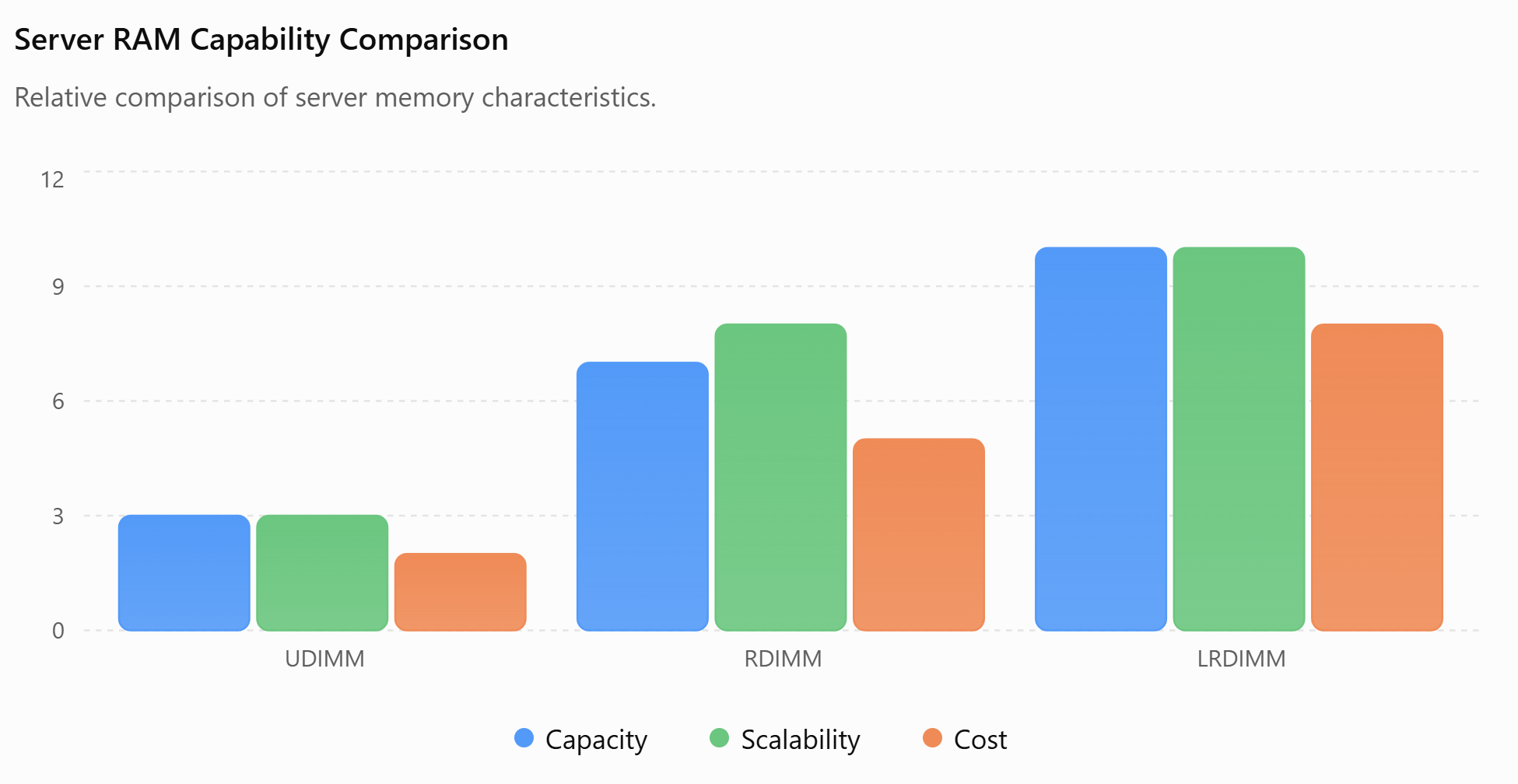
| Feature | UDIMM | RDIMM | LRDIMM |
|---|---|---|---|
| Buffering | No | Register Buffer | Isolation Memory Buffer |
| Cost | Lowest | Moderate | Highest |
| Maximum Capacity | Low | High | Very High |
| Reliability | Good | Excellent | Excellent |
| Scalability | Limited | High | Highest |
| Power Efficiency | Good | Good | Moderate |
| Enterprise Usage | Low | Very High | Very High |
| Virtualization Support | Basic | Excellent | Excellent |
Performance Comparison
UDIMM Performance
UDIMM modules generally offer slightly lower latency because there is no register between the memory controller and memory chips.
However, as memory capacity increases, signal integrity can become a challenge.
Best For
- Small business servers
- Entry-level workstations
- Light database workloads
RDIMM Performance
RDIMM balances performance and stability.
The registered buffer introduces a tiny latency increase, but the benefits in reliability and scalability outweigh this difference for most enterprise workloads.
Best For
- Enterprise applications
- Virtualization servers
- Database servers
- Cloud infrastructure
LRDIMM Performance
LRDIMM excels when maximum memory capacity is required.
While latency may be slightly higher than RDIMM, the ability to install significantly more memory often results in better overall system performance for memory-intensive workloads.
Best For
- AI workloads
- Large databases
- Virtual Desktop Infrastructure (VDI)
- High-performance computing (HPC)
- Large-scale virtualization
Capacity Differences
One of the biggest factors separating these memory types is maximum supported capacity.
Example Server Configuration
| Memory Type | Capacity Per Module | Total Capacity |
|---|---|---|
| UDIMM | 32GB | Lower overall capacity |
| RDIMM | 64GB | Higher server memory capacity |
| LRDIMM | 128GB+ | Maximum server capacity |
Organizations running virtual machines, cloud applications, and enterprise databases often choose LRDIMM because memory capacity directly impacts workload density.
Reliability and Error Handling
Most enterprise RDIMM and LRDIMM modules include ECC (Error-Correcting Code) technology.
ECC memory automatically detects and corrects memory errors before they affect applications.
Benefits include:
- Improved uptime
- Reduced crashes
- Better data integrity
- Enhanced server stability
For mission-critical applications, ECC-enabled RDIMM or LRDIMM is strongly recommended.
Power Consumption
Power efficiency becomes important in large server deployments.
UDIMM
- Lowest power usage
- Suitable for small environments
RDIMM
- Slightly higher power consumption
- Better performance-per-watt ratio
LRDIMM
- Highest power consumption
- Justified when high memory density is required
Which Server RAM Type Is Best for Virtualization?
Virtualization platforms such as VMware, Hyper-V, and Proxmox depend heavily on available memory.
Recommended Choice
✅ RDIMM for most virtualization servers
✅ LRDIMM for high-density virtual machine environments
❌ UDIMM is generally not recommended for large virtualization deployments.
Which RAM Type Is Best for Database Servers?
Database applications frequently cache large amounts of data in memory.
Best Options
- Small databases → RDIMM
- Medium enterprise databases → RDIMM
- Large databases → LRDIMM
The larger the memory pool, the less frequently data must be retrieved from storage, resulting in faster application performance.
Which RAM Type Is Best for Data Centers?
Most modern data centers prioritize:
- Reliability
- Scalability
- High memory density
- Reduced downtime
Recommended Choice
RDIMM remains the industry standard for most enterprise servers.
LRDIMM is preferred when servers require exceptionally large memory footprints.
Many global IT hardware distributors and server component suppliers, including companies such as Value Smart Trading (VSTL), frequently supply both RDIMM and LRDIMM modules to system integrators, data centers, and enterprise buyers worldwide due to their reliability and scalability advantages.
Can You Mix RDIMM, UDIMM, and LRDIMM Server RAM?
No.
Most server manufacturers do not support mixing these memory types in the same system.
Important Rules
- RDIMM and UDIMM cannot be mixed.
- RDIMM and LRDIMM cannot be mixed.
- Always verify server compatibility before upgrading memory.
- Check motherboard and CPU specifications.
Failure to follow compatibility requirements may prevent the server from booting.
How to Choose the Right Server RAM
Consider the following factors:
Choose UDIMM If:
- You operate a small server
- Budget is a major concern
- Memory requirements are limited
Choose RDIMM If:
- You run enterprise applications
- You need reliability and scalability
- You manage virtualization environments
Choose LRDIMM If:
- Maximum memory capacity is critical
- You operate large databases
- You run AI, HPC, or dense virtual machine workloads
Final Verdict
When comparing RDIMM vs UDIMM vs LRDIMM, there is no single winner for every scenario.
- UDIMM is ideal for entry-level servers and workstations.
- RDIMM offers the best balance of performance, reliability, and cost, making it the preferred choice for most enterprise servers.
- LRDIMM delivers the highest memory capacity and scalability, making it perfect for data centers, virtualization clusters, AI servers, and memory-intensive applications.
For most businesses and enterprise environments, RDIMM is the recommended choice, while organizations requiring massive memory footprints should invest in LRDIMM solutions.
By understanding the differences between these memory technologies, businesses can maximize server performance, improve reliability, and ensure future scalability.